Como podemos ajudar?

Não encontrou o que estava procurando?
Nova publicação5 comentários
-
Go to www.khanacademy.org/profile/me (The URL must not have "classroom" in it) and click on your avatar, which will bring up a menu that allows you to change your avatar. If the save button isn't visible, you need to zoom out the page.
-
Hi! 😁
I have a problem with my avatar change too. Clicking on the avatar does nothing. I’m starting to wonder if maybe my browser isn’t full approved by Khan, and thats why I’m having these problems?
I’ve also seen posts that other people made where they can see how many votes a post has, is that also something that I’m missing out on?
Thanks -
Hi beasleyaddison! You can change your avatar by going to your profile page:
-
Go to khanacademy.org/profile/me (make sure the URL doesn't say "classroom").
-
Click directly on your current avatar picture at the top.
-
Select your new avatar from the menu and click Save!
(Note: If you're on a mobile browser or phone, you may need to switch to "Desktop View" or turn your phone sideways if the Save button gets cut off!)
-


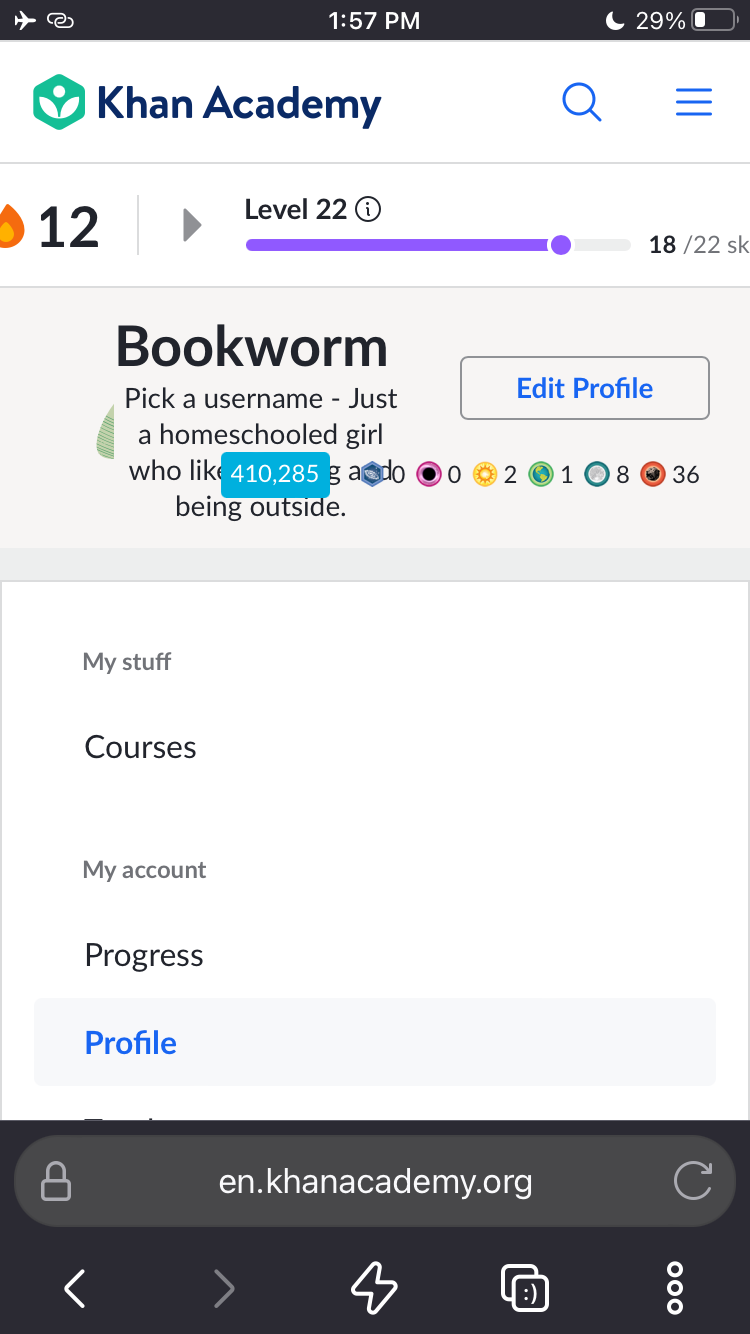 dash board looks like this, all squished up, but I can change my avatars now!
Por favor, entrar para comentar.