iOS, swipe/scroll issue on a picture graph

Khan Academy Version 7.0.2 (34973)
iOS 13.7
iPhone X
Nothing happens when swiping up or down (normally) on the picture graph, to scroll the page, in the following exercise:
--- beginning of exercise description
A group of friends went for some pony
rides.
Friend Pony rides
Ming 4
Wendy 3
Shruti 6
Anthony 6
Create a picture graph to show how
many pony rides each friend had.
(pony image) = 1 pony ride
(picture graph)
The vertical axis (left side) says (vertically starting from the bottom): Pony rides
The horizontal axis says: Friend
The middle of the picture graph shows the text: Tap to add points
The four friends are listed for each column:
Ming Wendy Shruti Anthony
--- end of exercise description

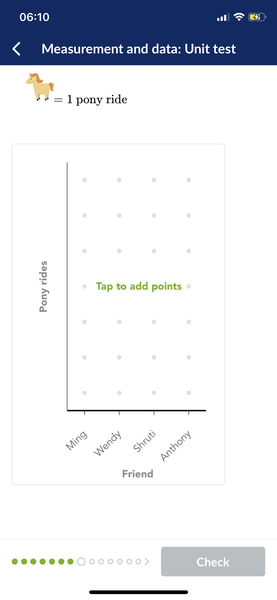
The page can be scrolled by swiping up or down outside the picture graph:
above and below, but there's only a small amount of space on the sides of the picture graph:
3mm to the left and 11mm to the right
The following happens when swiping up or down on the picture graph:
- On the left side of the picture graph where the vertical text says: Pony rides
Nothing happens.
- On the middle "Tap to add points" area.
Pony images are added/removed in the column where the swipe started.
- At the bottom of the picture graph where the names of the friends are listed for each column.
Nothing happens when swiping down, but when swiping up over the "Tap to add points area", then the pony images are added/removed from that column.
- At the very bottom of the picture graph on the text: Friend
Nothing happens when swiping up or down.
Notes:
It's possible to scroll by swiping on the picture graph, but will most likely only happen by accident.
If the page is swiped quickly outside the picture graph to start scrolling the page, then before the scrolling stops (it slows down before it stops), if one starts swiping up or down anywhere on the picture graph, then as long as a finger is held down on the picture graph, then one can keep swiping up and down and the page will scroll.
It has to be done quickly, swipe up or down outside the picture graph, and quickly start swiping on the picture graph.
A possible solution:
Since the main picture graph text says: Tap to add points
Then it probably would be better if the graph only detected taps to add/remove ponies on the graph.
And swiping up or down anywhere on the picture graph would scroll the page.
Currently it feels like somethings broken when one tries to swipe on the graph and nothing happens.

Bitte melden Sie sich an, um einen Kommentar zu hinterlassen.