How can we help?

Aradığınızı bulamadınız mı?
Yeni gönderi4 yorum
-
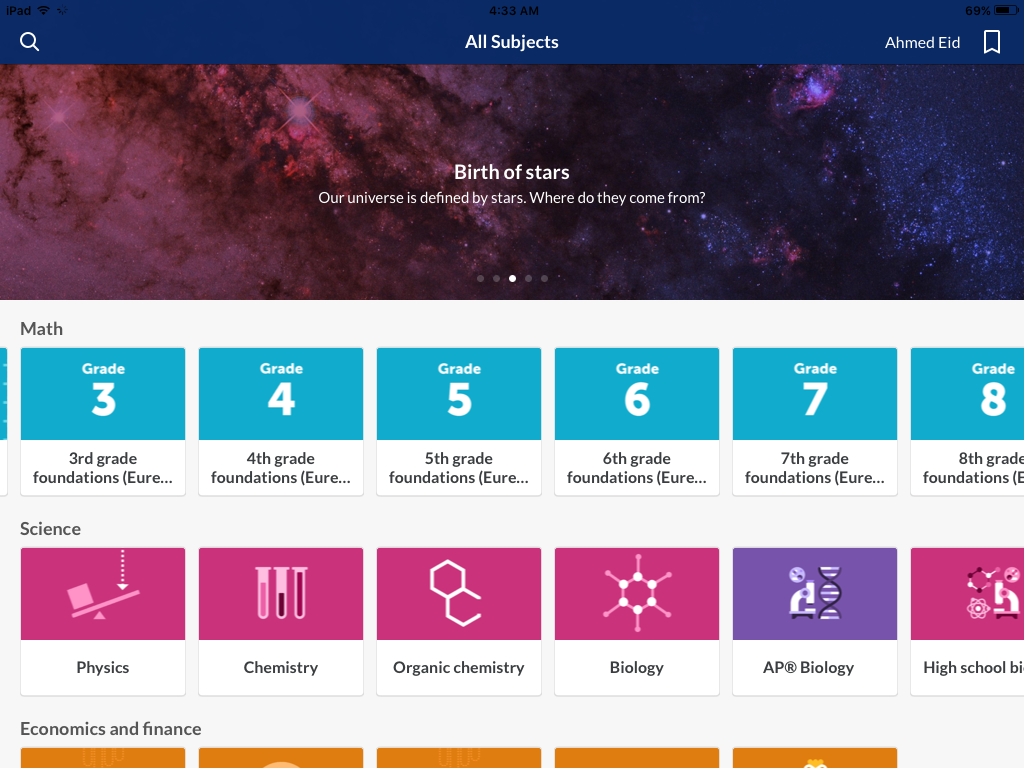
On my copy of the iPad app, the Kindergarten through 8th grade non-Eureka subjects are all the way to the left in the Math row of subjects. Scroll through them all the way to the left.
Better yet, swipe Khan Academy out of the Task Maanager. (If you need help to know what this is and how to do it, please let me know, and I’ll either explain it or send you to a place where you can get better help.) Then bring up Khan Academy again. At least for me, when the app opens again after having been swiped out of the Task Manager, it is back on the All Subjects screen, with all of the rows open with their left sides in view. You should now see Early math on the far left of the Math subject row, followed by Kindergarten, 1st Grade, etc.
-
Ahmed Eid, I am acknowledging your request for additional help. I am away from the computer where I’m more set up to give you the directions for swiping out Khan Academy from the Task Manager, so this will likely need to wait until later today (Sunday 7/1) or some time tomorrow (Monday 7/2).
However, now that you have explained what you see in more detail (and, incidentally, Early math is supposed to be the first one on the left, followed by grades Kindergarten through 8th), I think your issue may be more than just needing to swipe something out. I know that Khan Academy often presents a sequence of courses based on what country you are in (which itself is based on some device settings that I don’t know enough about to explain). It could be that your country, like the US state of New York, has adopted the Eureka curriculum, so everyone from there gets Eureka. BUT I AM JUST GUESSING HERE; it is not necessarily the case.
I suggest that you follow the Report a Problem link at the top of this Support Community page to let them know what you are seeing and how to get it fixed. In the meantime, when I get back to my computer, I’ll send the swiping out of Task Manager insructions.
-
I'm not sure if this is an option within the iPad version of the app (as I don't own an iPad), but from my iPhone there's a button labelled "See All" to the right of the "Math" heading in the Explore tab.
Clicking on this allows me to see all of the math courses available on the mobile app.


Yorum yazmak için lütfen oturum açın.