iOS: Numbers become stuck when they are dragged

In the exercise:
Convert to Roman numerals
It's located in:
Arithmetic (all content)
Unit: Place value
Roman numerals
Sometimes when trying to drag a number, then the dragged number become stock on top of another number, and trying to click or drag on the number boxes only adds an orange border around the box, but the boxes don't move.
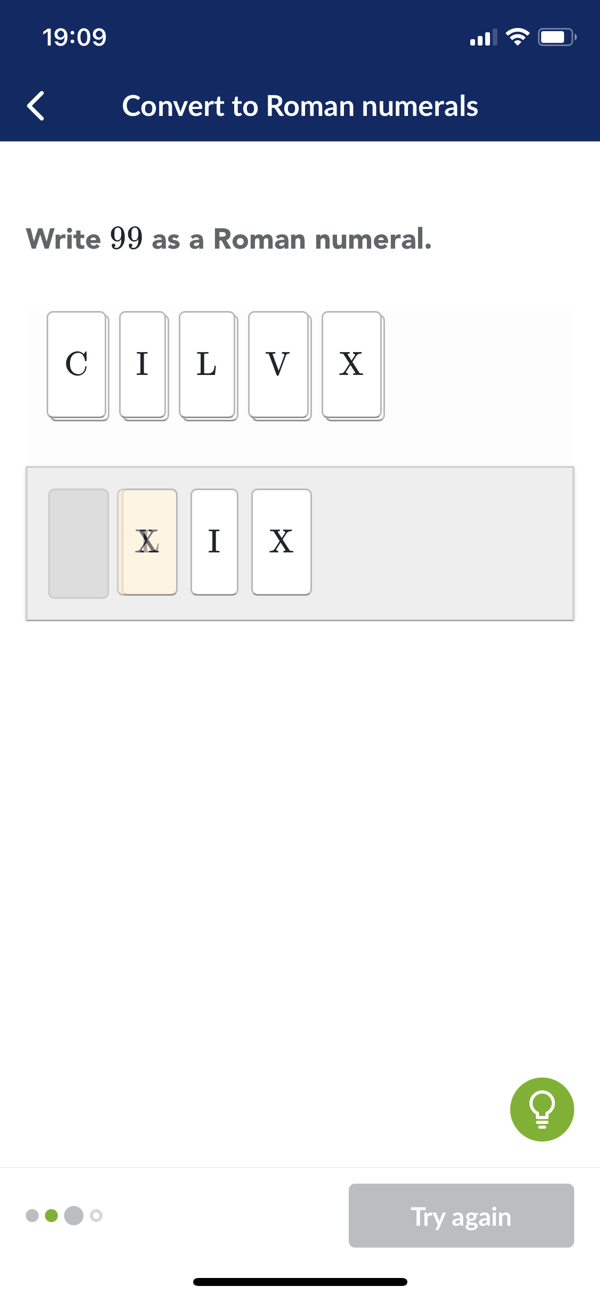
The same issue has been observed in similar exercises where numbers are dragged from a top area to a bottom area.
Sometimes the over lapping number boxes have disappeared when they are tapped or dragged, but other times no amount of tapping or dragging causes the stuck boxes to becoming unstuck.
In this state if a hint is opened by clicking on the bottom right lightbulb button, then the page can't be scrolled either.
A workaround is to reload the exercise by clicking the top left back button and reopening the exercise.
Khan Academy version 7.0.2 (34973)
iOS 14.0.1
iPhone X

Log ind for at efterlade en kommentar.