Как учителят може да проследява работата на учениците си в Кан Академия?
Обърни внимание: за видовете доклади след стартирането на Кан Академия Класна стая през юли 2026 г. виж статията: Какви доклади мога да използвам в обновената Кан Академия?
Khan Academy offers teachers insight to track their students' work on both assigned and unassigned content. This article will give you an overview of the different places you can find information about your student's performance on Mastery goals, Assignments, and any unassigned work your students have done at Khan Academy.
Once you have logged into your Khan Academy account and selected a class from your Teacher Dashboard, you will see the below options on the lefthand menu which offer data about student performance:
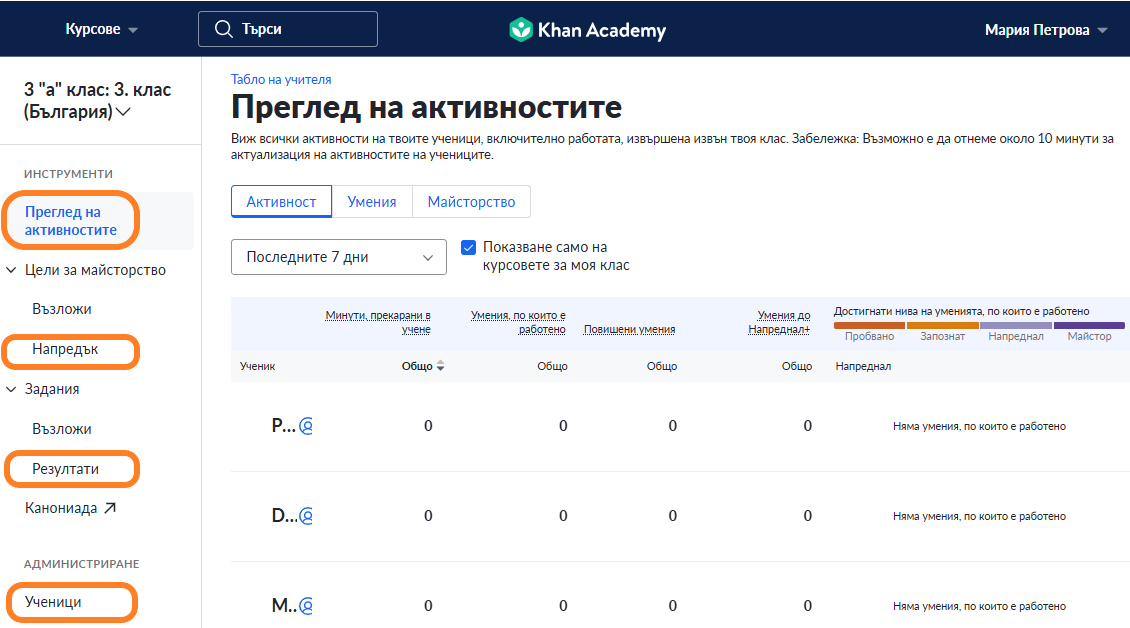
Тези варианти са изброени по-долу, като са описани накратко различните функционалности и е дадена връзка към съответната статия в Помощния център, където има повече информация как да се използва всеки от тях:
-
Activity Overview: offers data about student work on both assigned and unassigned content.
- These interactive and customizable reports allow teachers to drill into student work by many different metrics including learning time, skill comprehension, and Mastery levels.
- Additional Resource: How do I use the Activity Overview reports?
- Mastery Goals - Progress: offers insight about your students' progress towards their assigned Course or Unit Mastery goals.
-
Assignments - Scores: shows your students' scores and completion information for individual assignments they have been tasked with.
- From this report, student scores can be downloaded as a CSV for your records or grading platform of choice.
- Additional Resource: How do I use the assignment scores report?
-
Assignments - Manage: gives teachers access to the Responses and Completion reports. These show each of the students responded to the questions on the assignment, or who completed the video or article in its entirety.
- Additional Resource: How do I use the Responses and Completion Reports?
-
Individual Student Skills Report: Offers specific data about a student's work across all of Khan Academy, including learning time, skills worked on, and access to that students' settings.
- Additional Resource: How do I use the Individual Student Skills Report?
Below is a clip showing the different report options from the Teacher Dashboard:
- Khanmigo Reports: If you are part of a Khan Academy Districts Partnership and have students with Khanmigo access, you will also see the Khanmigo Activity and Khanmigo Usage reports under the "Khanmigo" section on your teacher dashboard.
-
Learning Paths Reports: If your district is using the Khan Academy + Learning Paths informed by MAP Growth product, you will also see the Learning Paths Placement and Learning Paths Progress reports under the "Khanmigo" section on your teacher dashboard.
We hope this article has helped you understand what reporting options Khan Academy offers for teachers to monitor progress, and pointed you in the right direction to find the report options that best meet your classroom needs.
For additional guidance or to share feedback, please reach out to our support team here! We are happy to help.